Declarative Agents
Agents are defined by specs and run server-side LLM tool-call loops. No external agent framework needed.
Agent Spec
agents:
  specs:
    research-assistant:
      model: "us.anthropic.claude-sonnet-4-20250514-v1:0"
      description: "A research assistant with long-term memory"
      system_prompt: |
        You are a research assistant with long-term memory.
        Use the remember tool to store important information.
      primitives:
        memory:
          enabled: true
          namespace: "agent:{agent_name}"
        browser:
          enabled: true
      provider_overrides:
        browser: "selenium_grid"
      hooks:
        auto_memory: true
        auto_trace: false
      max_turns: 20
      temperature: 1.0
Fields
| Field | Description | Default |
|---|---|---|
name |
Unique identifier | required |
model |
LLM model ID (e.g., Bedrock model ARN) | required |
description |
Human-readable description | "" |
system_prompt |
System prompt for the LLM | "You are a helpful assistant." |
primitives |
Enabled primitives with optional tool filtering | {} |
provider_overrides |
Per-primitive provider overrides | {} |
hooks.auto_memory |
Auto-save conversation turns to memory | true |
hooks.auto_trace |
Auto-trace to observability | true |
max_turns |
Maximum LLM calls per chat | 20 |
temperature |
LLM temperature | 1.0 |
max_tokens |
Maximum output tokens per LLM call | null (model default) |
checkpointing_enabled |
Durable runs that survive server restarts (requires Redis) | false |
shared_with |
Users/groups with access; ["*"] for all authenticated users |
[] (private) |
Each primitive entry supports:
| Field | Description | Default |
|---|---|---|
enabled |
Whether the primitive is active | true |
tools |
Specific tools to allow; null includes all |
null |
namespace |
Memory namespace (memory primitive only); supports {agent_name}, {session_id} placeholders |
null |
shared_namespaces |
Shared memory pool names (memory primitive only) | null |
Complete Example: All Primitives
An agent spec that enables every primitive the gateway supports:
agents:
  specs:
    full-stack-assistant:
      model: "us.anthropic.claude-sonnet-4-20250514-v1:0"
      description: "An assistant with access to all gateway primitives"
      system_prompt: |
        You are a capable assistant with memory, web browsing, code execution,
        external tool access, identity services, and the ability to delegate
        tasks to specialized agents.

        Always search memory before saying you don't know something.
        When tasks can be handled by a specialist, delegate to the
        appropriate agent.

      primitives:
        memory:
          enabled: true
          namespace: "agent:{agent_name}:{session_id}"
          # Tools: remember, recall, search_memory, forget, list_memories

        browser:
          enabled: true
          # Tools: navigate, read_page, click, type_text, screenshot, evaluate_js

        code_interpreter:
          enabled: true
          # Tools: execute_code

        tools:
          enabled: true
          # Tools: search_tools, invoke_tool
          # Discovers and invokes external tools via MCP Gateway Registry

        identity:
          enabled: true
          # Tools: get_token, get_api_key

        agents:
          enabled: true
          tools: ["researcher", "coder"]
          # Tools: call_researcher, call_coder

      provider_overrides:
        memory: "mem0"                 # Mem0 + Milvus
        browser: "selenium_grid"       # Selenium Grid
        code_interpreter: "jupyter"    # Jupyter Server
        tools: "mcp_registry"          # MCP Gateway Registry

      hooks:
        auto_memory: true              # Save each turn to memory
        auto_trace: true               # Trace each turn to observability

      max_turns: 30
      temperature: 1.0
      max_tokens: 4096
      checkpointing_enabled: true      # Durable runs (requires Redis)
      shared_with: ["*"]               # All authenticated users
The same spec can be created at runtime via POST /api/v1/agents:
curl -X POST http://localhost:8000/api/v1/agents \
  -H "Content-Type: application/json" \
  -d '{
    "name": "full-stack-assistant",
    "model": "us.anthropic.claude-sonnet-4-20250514-v1:0",
    "description": "An assistant with access to all gateway primitives",
    "system_prompt": "You are a capable assistant...",
    "primitives": {
      "memory": {"enabled": true, "namespace": "agent:{agent_name}:{session_id}"},
      "browser": {"enabled": true},
      "code_interpreter": {"enabled": true},
      "tools": {"enabled": true},
      "identity": {"enabled": true},
      "agents": {"enabled": true, "tools": ["researcher", "coder"]}
    },
    "provider_overrides": {
      "memory": "mem0",
      "browser": "selenium_grid",
      "code_interpreter": "jupyter",
      "tools": "mcp_registry"
    },
    "hooks": {"auto_memory": true, "auto_trace": true},
    "max_turns": 30,
    "max_tokens": 4096
  }'
How It Works
When you call POST /api/v1/agents/{name}/chat:
- Initialize: Load conversation history, inject stored memories, build tool list
- Loop: Call LLM → if tool_use, execute tools in parallel → repeat
- Finalize: Store conversation turn, trace, return response
User message → [memory context injection] → LLM → tool calls → LLM → response
                                              ↑                    |
                                              +--- tool results ---+
Available Tools
Each enabled primitive provides tools to the LLM:
| Primitive | Tools |
|---|---|
| memory | remember, recall, search_memory, forget, list_memories |
| code_interpreter | execute_code |
| browser | navigate, read_page, click, type_text, screenshot, evaluate_js |
| tools | search_tools, invoke_tool |
| identity | get_token, get_api_key |
| agents | call_{agent_name} (dynamic, one per sub-agent) |
| agent_management | create_agent, list_agents, list_primitives, delete_agent, delegate_to |
Tool Filtering
Limit which tools an agent can use:
primitives:
  memory:
    enabled: true
    tools: ["remember", "recall"]  # Only these two, not search/forget/list
Streaming
POST /api/v1/agents/{name}/chat/stream returns SSE events:
data: {"type": "stream_start", "session_id": "abc123"}
data: {"type": "token", "content": "Hello"}
data: {"type": "token", "content": " there!"}
data: {"type": "tool_call_start", "name": "remember", "id": "tc_1"}
data: {"type": "tool_call_result", "name": "remember", "id": "tc_1", "result": "Stored."}
data: {"type": "token", "content": "I've remembered that."}
data: {"type": "done", "response": "...", "turns_used": 2, "tools_called": ["remember"]}
Agent-as-Tool Delegation
Agents can call other agents. See Agent Delegation Guide.
coordinator:
  primitives:
    agents:
      enabled: true
      tools: ["researcher", "coder"]  # Names of other agents
The coordinator LLM gets call_researcher(message) and call_coder(message) tools.
Self-Creating Agents (Meta-Agent)
Instead of pre-defining sub-agents, a meta-agent can create new agents at runtime using the agent_management primitive:
This provides five tools:
| Tool | Description |
|---|---|
list_primitives() |
Discover available primitives and their tools |
create_agent(name, model, system_prompt, primitives) |
Create a new specialist agent |
delegate_to(agent_name, message) |
Run any agent by name (including just-created ones) |
list_agents() |
List all existing agents |
delete_agent(name) |
Clean up ephemeral agents |
The meta-agent assesses the task, creates tailored specialists with focused system prompts and the right primitives, delegates work, then cleans up:
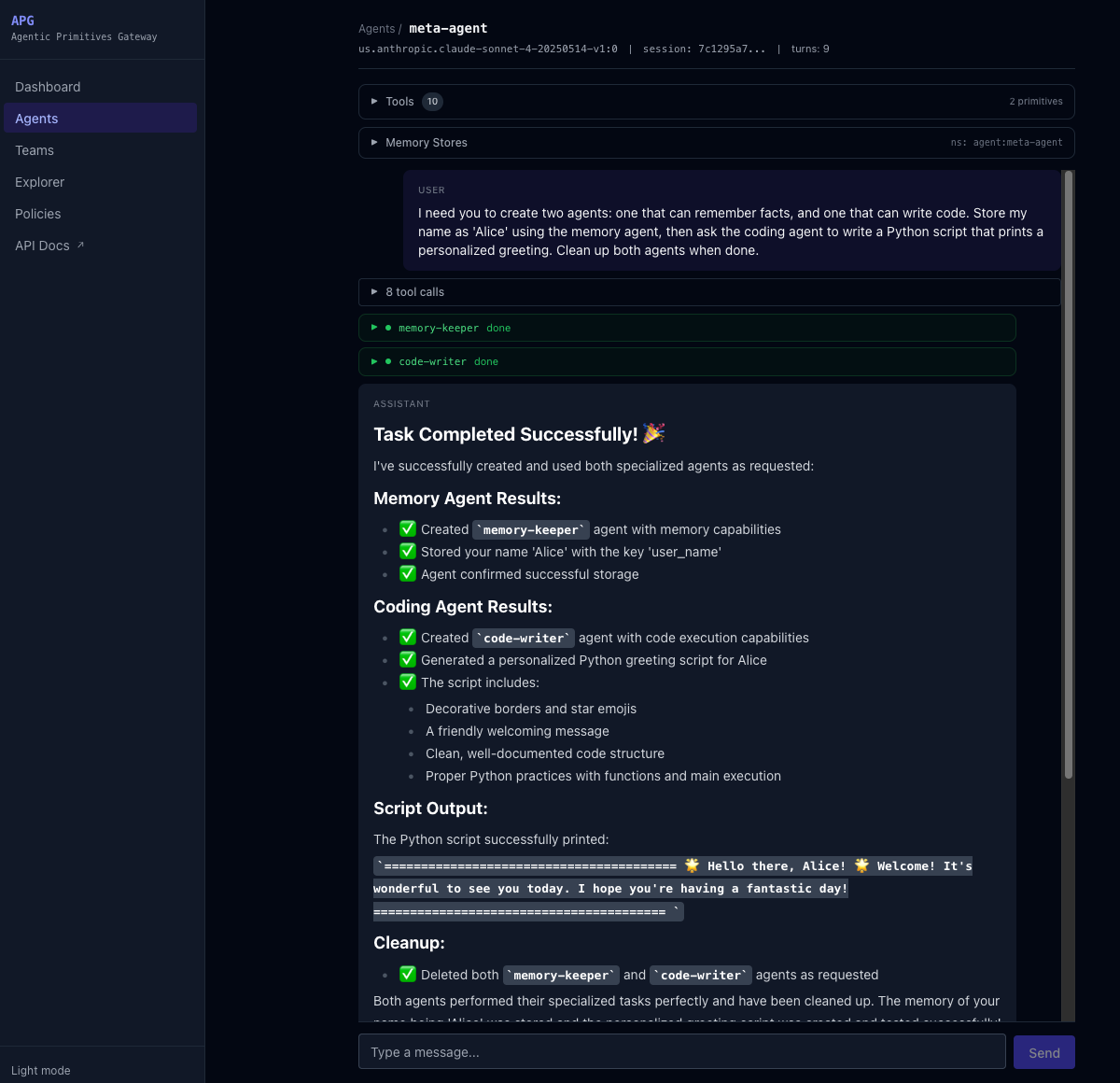
delegate_to works with any agent — pre-existing or just created. Sub-agent streaming events are forwarded to the UI in real time, showing the same activity panels as static delegation.
See Agent Delegation Guide for more details.
Shared Memory Pools
Agents can participate in shared memory pools via PrimitiveConfig.shared_namespaces. This enables memory sharing between agents without requiring a team:
researcher:
  primitives:
    memory:
      enabled: true
      namespace: "agent:{agent_name}"
      shared_namespaces: ["findings", "references"]
When shared_namespaces is configured, the agent gets additional tools:
| Tool | Description |
|---|---|
share_to(pool, key, content) |
Store a finding in a named shared pool |
read_from_pool(pool, key) |
Read a specific finding from a pool |
search_pool(pool, query) |
Search a shared pool by semantic similarity |
list_pool(pool) |
List all findings in a pool |
Each pool resolves to its declared namespace cross-user — the whole point of a shared pool is that Alice and Bob hit the same data. If the pool declares placeholders like {agent_name} or {agent_owner} they're substituted, but the :u: user-scoping suffix is not appended. Use the default private memory tools (remember/recall/search_memory) whenever you want per-user isolation.
This is Level 2 shared memory (agent-level pools). For Level 1 (team-scoped shared memory), see Teams.
Export
Agents can be exported as standalone Python scripts via GET /api/v1/agents/{name}/export. The generated script uses agentic-primitives-gateway-client for primitive calls and raw boto3 Bedrock converse() for the LLM loop. It includes all tool definitions, sub-agent delegation code, shared memory pool tools, JWT token refresh, and session management.
See the Agents API Reference for details.
Memory Namespaces
The namespace field controls where memories are stored. See Memory Namespaces Guide.
Sessions & Background Runs
Each chat uses a session_id to track conversation history. When auto_memory is enabled, completed turns are stored in the memory provider and can be retrieved later.
Background execution: Streaming chat runs in a background asyncio.Task. If the client disconnects (page refresh, navigation), the run continues to completion and stores the result. On reconnect, the UI polls /{name}/sessions/{id}/status and loads the conversation from /{name}/sessions/{id}.
Multiple sessions: Each agent can have many sessions. The UI stores session IDs in localStorage and provides a session picker to switch between them.
Checkpointing
Agent runs can be made durable by setting checkpointing_enabled: true on the agent spec. When enabled, the runner saves state to Redis before each LLM call. If the server crashes, another replica can resume the run from the last checkpoint. Partial tokens already delivered are recovered from the event store and fed back as a system prompt hint so the LLM continues where it left off.
See Configuration for the checkpointing config block.
Run Cancellation
An active run can be cancelled via DELETE /api/v1/agents/{name}/sessions/{session_id}/run. This cancels the background asyncio.Task, deletes the checkpoint from Redis, and sets the event store status to "cancelled". The session history up to the cancellation point is preserved.
SSE Reconnection
If a stream drops (server restart, network error), clients can reconnect to GET /api/v1/agents/{name}/sessions/{session_id}/stream. This endpoint replays all stored events from the event store, then polls for new events if the run is still active. Token events are throttled during replay for smooth delivery. The endpoint stays open for up to 3 minutes waiting for a resumed run to start producing events.
API
| Method | Path | Description |
|---|---|---|
POST |
/api/v1/agents |
Create agent |
GET |
/api/v1/agents |
List agents |
GET |
/api/v1/agents/{name} |
Get agent spec |
PUT |
/api/v1/agents/{name} |
Update agent |
DELETE |
/api/v1/agents/{name} |
Delete agent |
GET |
/api/v1/agents/{name}/export |
Export as standalone Python script |
POST |
/api/v1/agents/{name}/chat |
Chat (non-streaming) |
POST |
/api/v1/agents/{name}/chat/stream |
Chat (SSE streaming, background task) |
GET |
/api/v1/agents/{name}/sessions |
List sessions |
POST |
/api/v1/agents/{name}/sessions/cleanup |
Delete old sessions (keep most recent N) |
GET |
/api/v1/agents/{name}/sessions/{id} |
Get conversation history |
GET |
/api/v1/agents/{name}/sessions/{id}/status |
Check run status |
DELETE |
/api/v1/agents/{name}/sessions/{id} |
Delete session |
GET |
/api/v1/agents/{name}/sessions/{id}/stream |
SSE reconnect stream |
DELETE |
/api/v1/agents/{name}/sessions/{id}/run |
Cancel active run |
GET |
/api/v1/agents/{name}/tools |
List agent's tools with providers |
GET |
/api/v1/agents/{name}/memory |
Introspect memory stores |
GET |
/api/v1/agents/tool-catalog |
List all available primitives/tools |