Registration Webhooks and Gate
MCP Gateway Registry provides two external integration points for registration lifecycle events: notification webhooks that fire after a registration or deletion, and a registration gate (admission control) that can approve or deny registrations and updates before they are persisted.
Notification Webhooks
MCP Gateway Registry can send HTTP webhook notifications when servers, agents, or skills are registered (added) or deleted (removed). This enables external systems to react to registry changes in real time, for example updating a CMDB, triggering a CI/CD pipeline, sending a Slack notification, or syncing with a third-party inventory.
Overview
Registration webhooks are fire-and-forget: the registry sends an async POST to a configurable URL after a successful registration or deletion, logs the result, and moves on. A webhook failure never blocks or rolls back the operation that triggered it.
Supported Events
| Event Type | Trigger | Asset Types |
|---|---|---|
registration | A new asset is added to the registry | server, agent, skill |
deletion | An existing asset is removed from the registry | server, agent, skill |
Key Design Decisions
| Decision | Choice | Rationale |
|---|---|---|
| Delivery model | Fire-and-forget | Registry availability is never affected by webhook failures |
| Failure handling | Log at WARNING level | Operators can monitor via CloudWatch or log aggregation |
| Auth header handling | Auto-prefix Bearer for Authorization header | Follows RFC 6750 convention without extra config |
| HTTPS enforcement | Warn but allow HTTP | Avoids breaking dev/test setups while flagging insecure production use |
Configuration
Environment Variables
| Variable | Type | Default | Description |
|---|---|---|---|
REGISTRATION_WEBHOOK_URL | string | "" (disabled) | Full URL to POST to. Only http:// and https:// schemes are accepted. Leave empty to disable. |
REGISTRATION_WEBHOOK_AUTH_HEADER | string | Authorization | Name of the HTTP header used for authentication. If set to Authorization, the token is auto-prefixed with Bearer. For any other header (e.g. X-API-Key), the token is sent as-is. |
REGISTRATION_WEBHOOK_AUTH_TOKEN | string | "" | Auth token value. Leave empty for unauthenticated webhooks. |
REGISTRATION_WEBHOOK_TIMEOUT_SECONDS | int | 10 | HTTP timeout per request in seconds. |
Example Configurations
Unauthenticated webhook (dev/test):
REGISTRATION_WEBHOOK_URL=https://hooks.example.com/registry
REGISTRATION_WEBHOOK_AUTH_HEADER=Authorization
REGISTRATION_WEBHOOK_AUTH_TOKEN=
REGISTRATION_WEBHOOK_TIMEOUT_SECONDS=10
Bearer token authentication:
REGISTRATION_WEBHOOK_URL=https://hooks.example.com/registry
REGISTRATION_WEBHOOK_AUTH_HEADER=Authorization
REGISTRATION_WEBHOOK_AUTH_TOKEN=my-secret-bearer-token
REGISTRATION_WEBHOOK_TIMEOUT_SECONDS=10
The request will include Authorization: Bearer my-secret-bearer-token.
Custom API key header:
REGISTRATION_WEBHOOK_URL=https://hooks.example.com/registry
REGISTRATION_WEBHOOK_AUTH_HEADER=X-API-Key
REGISTRATION_WEBHOOK_AUTH_TOKEN=my-api-key-value
REGISTRATION_WEBHOOK_TIMEOUT_SECONDS=5
The request will include X-API-Key: my-api-key-value.
Webhook Payload
Every webhook POST sends a JSON body with the following structure:
{
    "event_type": "registration",
    "registration_type": "agent",
    "timestamp": "2026-04-23T14:30:00.000000+00:00",
    "performed_by": "admin@example.com",
    "card": {
        "name": "My Agent",
        "path": "/agents/my-agent",
        "description": "An example A2A agent",
        "...": "full card data as stored in the registry"
    }
}
Payload Fields
| Field | Type | Description |
|---|---|---|
event_type | string | "registration" (asset added) or "deletion" (asset removed) |
registration_type | string | "server", "agent", or "skill" |
timestamp | string | ISO 8601 timestamp in UTC |
performed_by | string or null | Username of the operator who performed the action (null if unknown) |
card | object | The full card JSON as stored in the registry |
HTTP Request Details
| Aspect | Value |
|---|---|
| Method | POST |
| Content-Type | application/json |
| Timeout | Configurable via REGISTRATION_WEBHOOK_TIMEOUT_SECONDS |
| Retries | None (fire-and-forget) |
| TLS verification | Enabled by default (httpx default behavior) |
Deployment Configuration
The webhook environment variables must be set on the registry service (not the auth server).
Docker Compose
All three Compose files (docker-compose.yml, docker-compose.podman.yml, docker-compose.prebuilt.yml) pass the variables to the mcp-gateway-registry service:
services:
  mcp-gateway-registry:
    environment:
      - REGISTRATION_WEBHOOK_URL=${REGISTRATION_WEBHOOK_URL:-}
      - REGISTRATION_WEBHOOK_AUTH_HEADER=${REGISTRATION_WEBHOOK_AUTH_HEADER:-Authorization}
      - REGISTRATION_WEBHOOK_AUTH_TOKEN=${REGISTRATION_WEBHOOK_AUTH_TOKEN:-}
      - REGISTRATION_WEBHOOK_TIMEOUT_SECONDS=${REGISTRATION_WEBHOOK_TIMEOUT_SECONDS:-10}
Terraform / ECS
The variables are defined in terraform/aws-ecs/variables.tf and wired into the registry ECS task definition via terraform/aws-ecs/modules/mcp-gateway/ecs-services.tf (inside module "ecs_service_registry").
Set values in terraform.tfvars:
registration_webhook_url             = "https://hooks.example.com/registry"
registration_webhook_auth_header     = "X-API-Key"
registration_webhook_auth_token      = "my-api-key"
registration_webhook_timeout_seconds = 10
For sensitive values (tokens), use AWS Secrets Manager references instead of plaintext in tfvars.
Helm / EKS
The variables are defined in charts/registry/values.yaml and mapped in the deployment template and secret:
# charts/registry/values.yaml
registrationWebhook:
  url: ""
  authHeader: "Authorization"
  authToken: ""
  timeoutSeconds: 10
Sensitive values (auth tokens) are stored in the Kubernetes secret (charts/registry/templates/secret.yaml) and injected via secretKeyRef.
Logging and Observability
The webhook service logs at three levels:
| Level | Condition | Example Message |
|---|---|---|
| INFO | Webhook sent successfully | Registration webhook sent: event=registration, type=agent, status=200, url=https://... |
| WARNING | Timeout or connection failure | Registration webhook timed out after 10s: event=registration, type=agent, url=https://... |
| WARNING | HTTP (not HTTPS) URL configured | Registration webhook URL uses HTTP (not HTTPS). Credential data may be transmitted insecurely. |
| ERROR | Invalid URL scheme | Invalid webhook URL scheme: ftp://... |
In ECS deployments, these log messages appear in the registry task's CloudWatch Log Group.
Building a Webhook Receiver
A minimal webhook receiver only needs to accept a POST with a JSON body and return a 2xx status code. Here is a Python example:
from fastapi import FastAPI, Request

app = FastAPI()

@app.post("/webhook")
async def handle_webhook(request: Request):
    payload = await request.json()
    event = payload.get("event_type")
    asset_type = payload.get("registration_type")
    card = payload.get("card", {})
    name = card.get("name") or card.get("display_name", "unknown")

    print(f"Received {event} event for {asset_type}: {name}")

    # Your custom logic here:
    # - Send a Slack notification
    # - Update a CMDB
    # - Trigger a CI/CD pipeline
    # - Sync with an external inventory

    return {"status": "ok"}
Run with: uvicorn receiver:app --host 0.0.0.0 --port 6789
Troubleshooting
| Symptom | Cause | Fix |
|---|---|---|
| No webhook logs at all | REGISTRATION_WEBHOOK_URL is empty or not set | Set the variable in the correct service |
| Webhook env vars set but no calls | Variables on the wrong ECS service | Ensure they are on the registry service, not the auth server |
| Timeout warnings | Receiver too slow or unreachable | Increase REGISTRATION_WEBHOOK_TIMEOUT_SECONDS or check network connectivity |
| HTTP warning in logs | URL uses http:// instead of https:// | Switch to HTTPS for production |
Registration Gate (Admission Control)
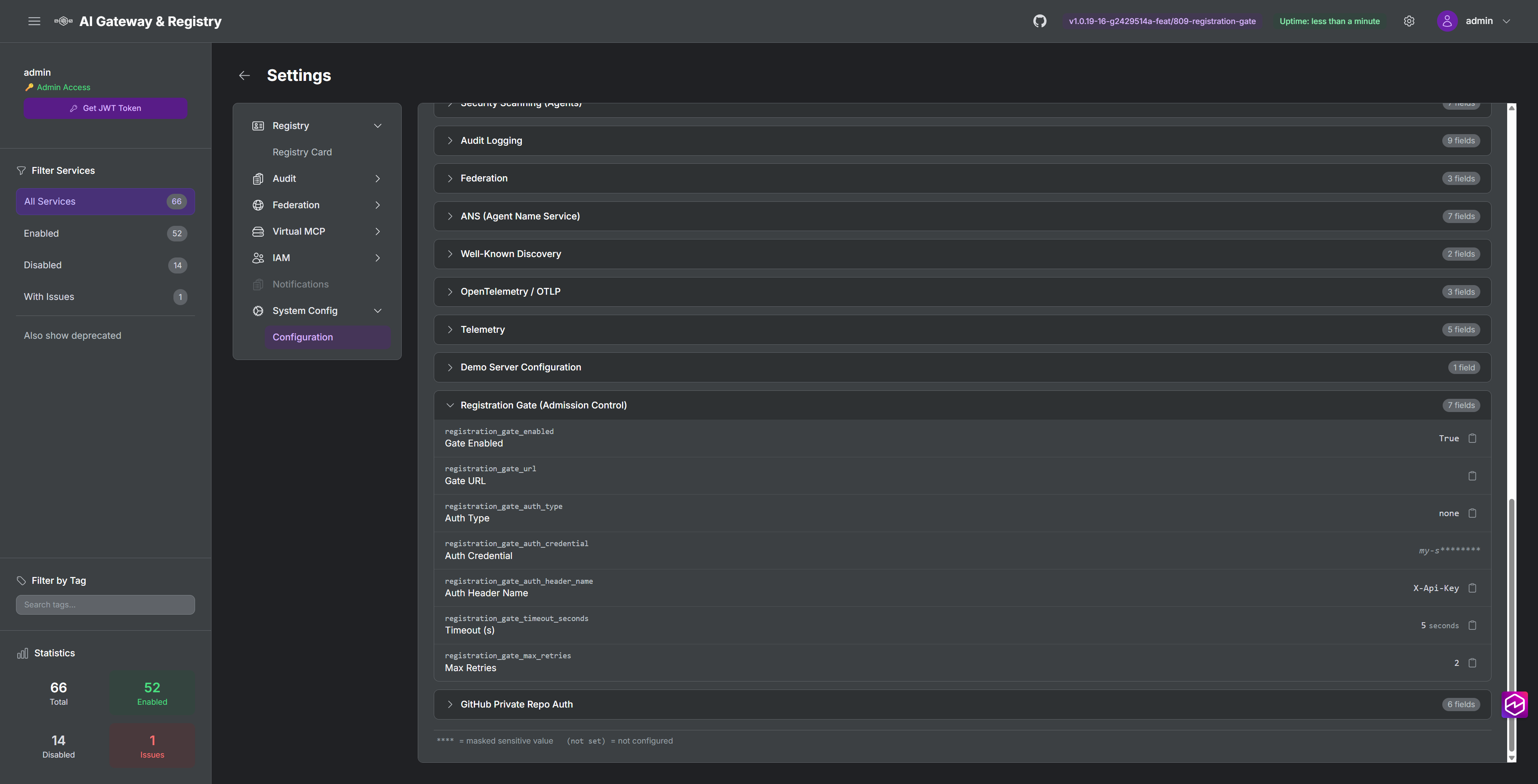
The registration gate is an admission control webhook called before a registration or update is persisted. Unlike the notification webhook above (which fires after the fact and cannot block the operation), the registration gate can approve or deny a request based on custom business logic such as naming conventions, compliance rules, or approval workflows.
How It Differs from the Notification Webhook
| Aspect | Notification Webhook | Registration Gate |
|---|---|---|
| Timing | After the registration is persisted | Before the registration is persisted |
| Can block registration | No (fire-and-forget) | Yes (approve/deny) |
| Failure behavior | Logged, never blocks caller | Fail-closed: blocks registration if gate is unavailable |
| Retries | None | Configurable with exponential backoff |
| Applies to | Registration and deletion events | Registration and update events |
| Credential handling | Full card data sent | Credentials stripped from payload |
Capabilities
- Approve or deny registrations and updates for servers, agents, and skills
- Configurable authentication: none, API key, or Bearer token
- Fail-closed design: if the gate is unreachable after retries, registration is blocked
- Custom denial messages returned to the caller as HTTP 403
- Sensitive fields (credentials, tokens, passwords) are automatically stripped from the payload sent to the gate
- Exponential backoff retries (0.5s, 1s, 2s, ...)
- Startup connectivity check (non-blocking, logs warnings if gate is unreachable)
Gate Protocol
The registry sends a POST request to the gate URL with the following JSON body:
{
  "asset_type": "agent",
  "operation": "register",
  "source_api": "/api/agents/register",
  "registration_payload": { ... },
  "request_headers": { "host": "...", "content-type": "..." }
}
Fields:
| Field | Description |
|---|---|
asset_type | "agent", "server", or "skill" |
operation | "register" or "update" |
source_api | The API path that triggered the request |
registration_payload | The registration data with sensitive fields removed |
request_headers | HTTP headers from the original request (sensitive headers excluded) |
Gate Response Codes:
| Status Code | Meaning |
|---|---|
200 | Registration allowed |
403 | Registration denied. Response body may include {"error": "reason"} |
| Any other | Triggers retry (unexpected status) |
Credential Sanitization
The following fields are automatically removed from registration_payload before sending to the gate:
- Fields named:
auth_credential,auth_credential_encrypted,auth_header_name - Fields containing:
credential,secret,token,password,api_key
Sensitive request headers are also excluded: authorization, cookie, x-csrf-token.
Configuration
| Variable | Default | Description |
|---|---|---|
REGISTRATION_GATE_ENABLED | false | Enable/disable the gate |
REGISTRATION_GATE_URL | (empty) | URL of the gate endpoint. Must be set when enabled |
REGISTRATION_GATE_AUTH_TYPE | none | Auth type: none, api_key, bearer, or oauth2_client_credentials |
REGISTRATION_GATE_AUTH_CREDENTIAL | (empty) | API key or Bearer token value (for api_key or bearer auth) |
REGISTRATION_GATE_AUTH_HEADER_NAME | X-Api-Key | Header name for api_key auth type |
REGISTRATION_GATE_TIMEOUT_SECONDS | 5 | HTTP timeout per attempt (seconds) |
REGISTRATION_GATE_MAX_RETRIES | 2 | Retry attempts after first failure (exponential backoff) |
REGISTRATION_GATE_OAUTH2_TOKEN_URL | (empty) | OAuth2 token endpoint URL (required for oauth2_client_credentials) |
REGISTRATION_GATE_OAUTH2_CLIENT_ID | (empty) | OAuth2 client ID (required for oauth2_client_credentials) |
REGISTRATION_GATE_OAUTH2_CLIENT_SECRET | (empty) | OAuth2 client secret (required for oauth2_client_credentials) |
REGISTRATION_GATE_OAUTH2_SCOPE | (empty) | OAuth2 scope parameter (optional, e.g. api://app-id/.default for Entra) |
OAuth2 Client Credentials Authentication
When the gate endpoint is protected by an OAuth2 identity provider (e.g., Microsoft Entra ID, Okta, Auth0, Keycloak, or Cognito), set REGISTRATION_GATE_AUTH_TYPE=oauth2_client_credentials and configure the token endpoint credentials. The registry acquires a fresh access token via the OAuth2 Client Credentials flow (RFC 6749 Section 4.4) before each gate call.
How it works:
- Before calling the gate endpoint, the registry POSTs to the configured token URL with
grant_type=client_credentials,client_id,client_secret, and optionallyscope - If the token endpoint returns a valid
access_token, the registry sends it asAuthorization: Bearer <token>to the gate - If token acquisition fails (timeout, invalid credentials, network error), the registration is blocked immediately (fail-closed). No gate call is attempted.
OAuth2 Configuration Parameters:
| Variable | Default | Required | Description |
|---|---|---|---|
REGISTRATION_GATE_OAUTH2_TOKEN_URL | (empty) | Yes | OAuth2 token endpoint URL. This is the IdP endpoint that issues access tokens via the client credentials grant. Example (Entra): https://login.microsoftonline.com/{tenant-id}/oauth2/v2.0/token |
REGISTRATION_GATE_OAUTH2_CLIENT_ID | (empty) | Yes | OAuth2 client ID (also called "application ID" in Entra). The service principal identity used to authenticate with the token endpoint. |
REGISTRATION_GATE_OAUTH2_CLIENT_SECRET | (empty) | Yes | OAuth2 client secret. The credential paired with the client ID. This value is sensitive and is masked on the System Config page. Never logged. |
REGISTRATION_GATE_OAUTH2_SCOPE | (empty) | No | OAuth2 scope or resource parameter sent in the token request. Some IdPs require this (e.g., Entra requires api://{app-id}/.default), others use it optionally or not at all. Leave empty if your IdP does not require a scope for client credentials grants. |
All four parameters are available in Docker (.env / docker-compose.yml), Terraform/ECS (variables.tf / ecs-services.tf), Helm/EKS (values.yaml / secret.yaml), and the System Config page in the UI.
Example configuration (Entra ID):
REGISTRATION_GATE_ENABLED=true
REGISTRATION_GATE_URL=https://gate.example.com/check
REGISTRATION_GATE_AUTH_TYPE=oauth2_client_credentials
REGISTRATION_GATE_OAUTH2_TOKEN_URL=https://login.microsoftonline.com/{tenant-id}/oauth2/v2.0/token
REGISTRATION_GATE_OAUTH2_CLIENT_ID=your-client-id
REGISTRATION_GATE_OAUTH2_CLIENT_SECRET=your-client-secret
REGISTRATION_GATE_OAUTH2_SCOPE=api://your-app-id/.default
Example configuration (Okta):
REGISTRATION_GATE_AUTH_TYPE=oauth2_client_credentials
REGISTRATION_GATE_OAUTH2_TOKEN_URL=https://dev-123456.okta.com/oauth2/default/v1/token
REGISTRATION_GATE_OAUTH2_CLIENT_ID=your-client-id
REGISTRATION_GATE_OAUTH2_CLIENT_SECRET=your-client-secret
REGISTRATION_GATE_OAUTH2_SCOPE=api://gate
Example configuration (Keycloak):
REGISTRATION_GATE_AUTH_TYPE=oauth2_client_credentials
REGISTRATION_GATE_OAUTH2_TOKEN_URL=https://keycloak.example.com/realms/mcp-gateway/protocol/openid-connect/token
REGISTRATION_GATE_OAUTH2_CLIENT_ID=your-client-id
REGISTRATION_GATE_OAUTH2_CLIENT_SECRET=your-client-secret
REGISTRATION_GATE_OAUTH2_SCOPE=
Startup validation: At startup, the registry verifies that all required OAuth2 fields (token_url, client_id, client_secret) are set when auth_type is oauth2_client_credentials, and attempts a test token acquisition. Warnings are logged if the token URL uses HTTP instead of HTTPS, or if the test token acquisition fails.
See issue #917 for the full design specification.
Endpoints Covered
The gate is checked on the following operations:
| Asset Type | Operation | Endpoint |
|---|---|---|
| Agent | Register | POST /api/agents/register |
| Agent | Update | PUT /api/agents/{path} |
| Server | Register | POST /servers/register, POST /internal/register, POST /api/servers/register |
| Server | Update | POST /edit/{path} |
| Skill | Register | POST /api/skills |
| Skill | Update | PUT /api/skills/{path} |
Example: Simple Gate Endpoint
A minimal Python gate endpoint that approves all registrations:
from fastapi import FastAPI, Request

app = FastAPI()

@app.post("/gate")
async def gate(request: Request):
    body = await request.json()
    # Implement your approval logic here
    return {"status": "allowed"}
To deny a registration, return HTTP 403 with an error message:
from fastapi import FastAPI, Request
from fastapi.responses import JSONResponse

app = FastAPI()

@app.post("/gate")
async def gate(request: Request):
    body = await request.json()
    name = body.get("registration_payload", {}).get("name", "")
    if not name.startswith("prod-"):
        return JSONResponse(
            status_code=403,
            content={"error": "All production assets must start with 'prod-'"},
        )
    return {"status": "allowed"}
See issue #809 for the full design specification.