Custom Entity Types
Demo video (60s): Custom Entity Types walkthrough
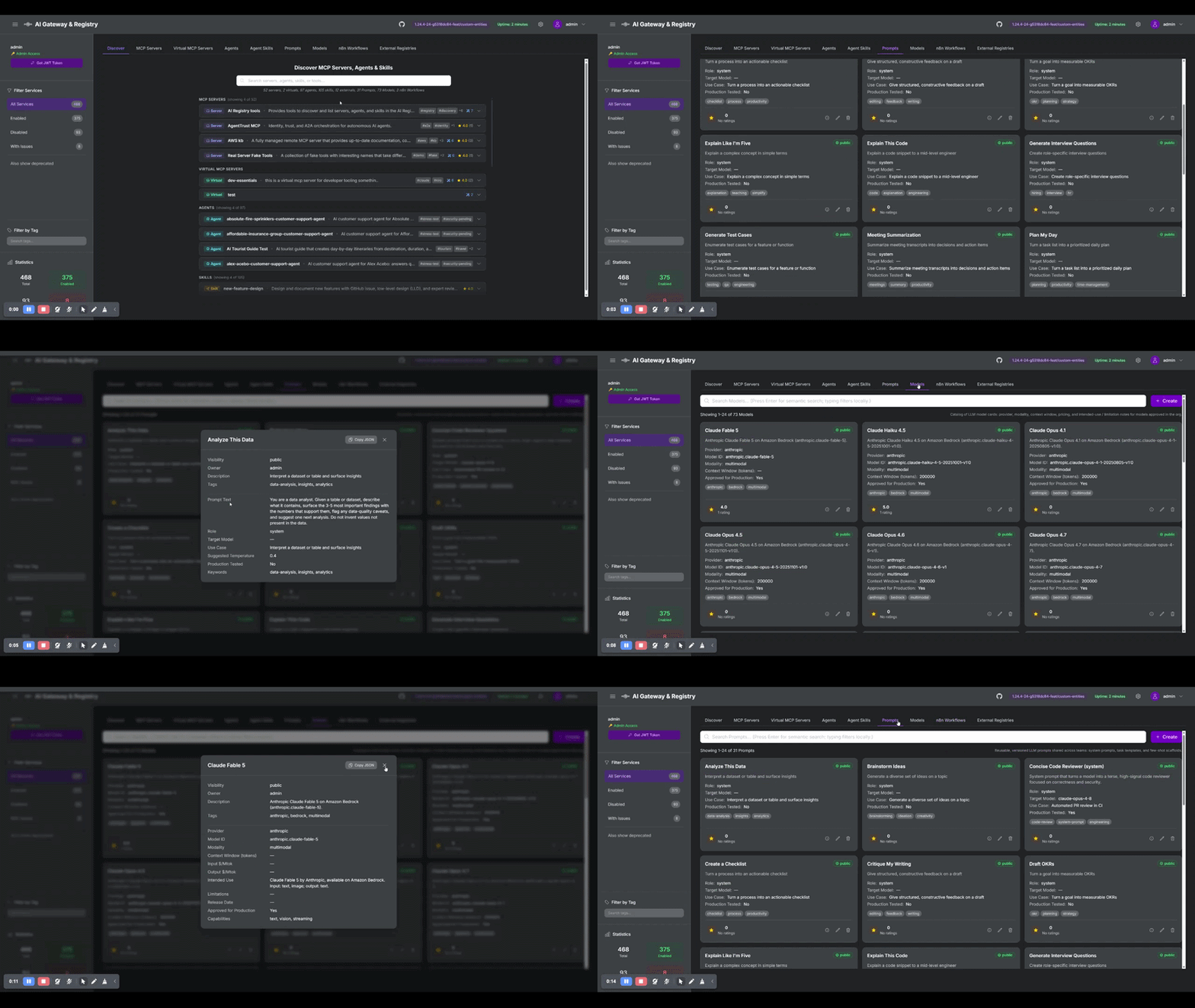
Custom entity types let a registry admin define new catalog types at runtime, each with its own schema, and then store records of that type. Records get their own dynamically-rendered tab, lexical and semantic search, a star rating, and appear in the unified "search everything" results alongside MCP servers, agents, and skills.
Use them to catalog anything the built-in types (servers, agents, skills) don't cover, for example: LLM prompts, model cards, n8n workflows, runbooks, datasets, or evaluation suites.
Feature flag: Custom entity types are off by default. Enable with
CUSTOM_ENTITY_TYPES_ENABLED=true. When off, the routers are not registered, the tabs are hidden, and existing records are excluded from search (the data stays in the datastore but is unreachable until the flag is re-enabled). See Configuration.
Core concept: types first, then records
There are two distinct objects, and the order matters:
- Custom TYPE (the schema). An admin defines a type once, programmatically, via
POST /api/custom-types. A type has a URL-safename(immutable), an optionaldisplay_namefor the tab, and a list of typedfields. There is no UI for creating a type — it is an admin, API-only operation. - Records (instances of the type). Once the type exists, records can be created either programmatically (
POST /api/custom/{type}) or through the UI (the dynamically-rendered tab has a Create form). Any authenticated user can create records (subject to visibility rules); the type itself is admin-only.
Admin defines TYPE (API only)  ->  Users create RECORDS (API or UI)
        /api/custom-types                /api/custom/{type}  or  the UI tab
This split is deliberate: defining a schema is a privileged, low-frequency operation, while creating records of an existing schema is everyday usage.
Field schema
Each field in a type descriptor has:
| Property | Required | Meaning |
|---|---|---|
name | yes | Attribute key stored inside the record's attributes bag (alphanumeric/underscore, max 64). Must not collide with reserved envelope keys. |
datatype | yes | One of the datatypes below. |
label | no | Display label; falls back to a humanized name. |
enum_values | enum only | Allowed values; required when datatype is enum, rejected otherwise. |
required | no | If true, the record must supply this attribute. Defaults to false. |
semantic | no | If true, the field's value is included in the search embedding text. |
show_in_list | no | If true, the field is rendered on the list/card view. |
Datatypes: string (single-line), text (multi-line), number (int or float), bool (checkbox), enum (select; needs enum_values), date (ISO-8601 YYYY-MM-DD), array<string> (tag/chip input).
Step 1: Define a type (admin, API only)
The descriptor is admin-authored. Post it to /api/custom-types. Example, an llm_prompt type:
export TOK=$(jq -r '.tokens.access_token // .access_token' .token)

curl -sS -X POST http://localhost/api/custom-types \
  -H "Authorization: Bearer $TOK" -H "Content-Type: application/json" \
  -d '{
    "name": "llm_prompt",
    "display_name": "Prompts",
    "description": "Reusable, versioned LLM prompts shared across teams.",
    "fields": [
      { "name": "prompt_text", "label": "Prompt Text", "datatype": "text",
        "required": true, "semantic": true },
      { "name": "role", "label": "Role", "datatype": "enum",
        "enum_values": ["system", "user", "assistant", "developer"],
        "required": true, "show_in_list": true },
      { "name": "use_case", "label": "Use Case", "datatype": "string",
        "semantic": true, "show_in_list": true },
      { "name": "temperature", "label": "Suggested Temperature", "datatype": "number" },
      { "name": "tested", "label": "Production Tested", "datatype": "bool",
        "show_in_list": true }
    ]
  }'
Or with the management CLI:
uv run python api/registry_management.py --registry-url http://localhost --token-file .token \
  custom-type-create --config cli/examples/custom_type_llm_prompt.json
Ready-to-use example descriptors live in cli/examples/: custom_type_llm_prompt.json, custom_type_model_card.json, custom_type_n8n_workflow.json (plus a matching custom_record_*.json for each).
Notes:
nameis URL-safe (^[a-z0-9_-]+$, max 64), IMMUTABLE, and becomes both the record path prefix (/{name}/{uuid}) and theentity_typediscriminator.- Type creation is admin-only (
mcp-registry-admingroup/scope oris_admin). - Reserved type names (
mcp_server,a2a_agent,skill,virtual_server,tool) are rejected.
Editing a type
The type name and the field schema are immutable (changing them would orphan existing records and embeddings). Only the human-facing metadata can be edited, via PATCH /api/custom-types/{name}:
curl -sS -X PATCH http://localhost/api/custom-types/llm_prompt \
  -H "Authorization: Bearer $TOK" -H "Content-Type: application/json" \
  -d '{"display_name": "Prompts", "description": "Updated description."}'
To change a type's name or fields, delete and recreate it (a destructive operation that cascades away its records).
Step 2: Create records (API or UI)
Programmatically
curl -sS -X POST http://localhost/api/custom/llm_prompt \
  -H "Authorization: Bearer $TOK" -H "Content-Type: application/json" \
  -d '{
    "name": "Concise Code Reviewer",
    "description": "System prompt for terse, high-signal code review.",
    "visibility": "public",
    "tags": ["code-review", "engineering"],
    "attributes": {
      "prompt_text": "You are a senior engineer reviewing a PR...",
      "role": "system",
      "use_case": "Automated PR review in CI",
      "temperature": 0.2,
      "tested": true
    }
  }'
Or via the CLI:
uv run python api/registry_management.py --registry-url http://localhost --token-file .token \
  custom-record-create --type llm_prompt --config cli/examples/custom_record_llm_prompt.json
The record envelope is uniform across all types: name, description, visibility (public / private / group-restricted), allowed_groups, tags, plus the per-type attributes validated against the descriptor. The owner is always derived from the caller, never the request body.
Through the UI
Once the type exists and the feature is enabled, its tab appears in the dashboard (rendered dynamically from the descriptor). The tab provides a Create button that opens a schema-driven form with the right widget per datatype (text input, textarea, number, checkbox, enum select, date picker, tag chips). Records can be created, edited, viewed (with a Copy JSON button that copies the full stored record), rated, and deleted from the UI. The listing is paginated client-side.
Searching custom records
Custom records participate in the unified semantic search automatically when the feature is enabled. A default-scope query returns them alongside the other entity types:
curl -sS -X POST http://localhost/api/search/semantic \
  -H "Authorization: Bearer $TOK" -H "Content-Type: application/json" \
  -d '{"query": "summarize my meeting into action items", "limit": 5}' | jq '.custom'
To scope to specific custom types, pass their names in entity_types:
Fields marked semantic: true in the descriptor feed the embedding text, so choose those fields to make records findable by their substance.
API surface
| Action | Method + Path | Auth |
|---|---|---|
| List types | GET /api/custom-types | any authenticated |
| Get type | GET /api/custom-types/{name} | any authenticated |
| Create type | POST /api/custom-types | admin |
| Update type metadata | PATCH /api/custom-types/{name} | admin |
| Delete type (cascading) | DELETE /api/custom-types/{name}?force=true | admin |
| List records | GET /api/custom/{type}?skip=0&limit=100 | any authenticated (visibility-filtered) |
| Create record | POST /api/custom/{type} | any authenticated |
| Update record | PUT /api/custom/{type}/{uuid} | owner or admin |
| Delete record | DELETE /api/custom/{type}/{uuid} | owner or admin |
| Rate record | POST /api/custom/{type}/{uuid}/rate | any with view access |
| Get rating | GET /api/custom/{type}/{uuid}/rating | any with view access |
The list endpoint is paginated: pass skip and limit (max 1000); the response includes records, total_count, skip, and limit.
Configuration
| Parameter | Default | Purpose |
|---|---|---|
CUSTOM_ENTITY_TYPES_ENABLED | false | Master switch. Off = feature invisible (routers unregistered, tabs hidden, records excluded from search). |
CUSTOM_TYPE_CACHE_TTL_SECONDS | 60 | TTL for the in-process descriptor cache used by read paths. |
MAX_CUSTOM_RECORDS_PER_TYPE | 1000 | Soft (best-effort) cap on records per type; 0 = unlimited. |
MAX_CUSTOM_TYPES | 50 | Cap on the number of types an admin can define; 0 = unlimited. |
These are wired across all three deployment surfaces (Docker .env, Terraform .tfvars, Helm values.yaml); see docs/unified-parameter-reference.md.
Resource governance
Each type carries its own embedding collection, and each record write triggers an embedding computation. To keep a multi-tenant registry bounded, both a type cap (MAX_CUSTOM_TYPES, default 50) and a per-type record cap (MAX_CUSTOM_RECORDS_PER_TYPE, default 1000) are enforced; hitting either returns HTTP 409. Descriptor text fields (labels, display names, descriptions, enum options) are length-bounded so a single descriptor cannot bloat the cached snapshot held by every replica. Both caps are best-effort under heavy concurrency (count-then-create), which is acceptable for admin-gated, low-frequency type creation and bulk record imports.